
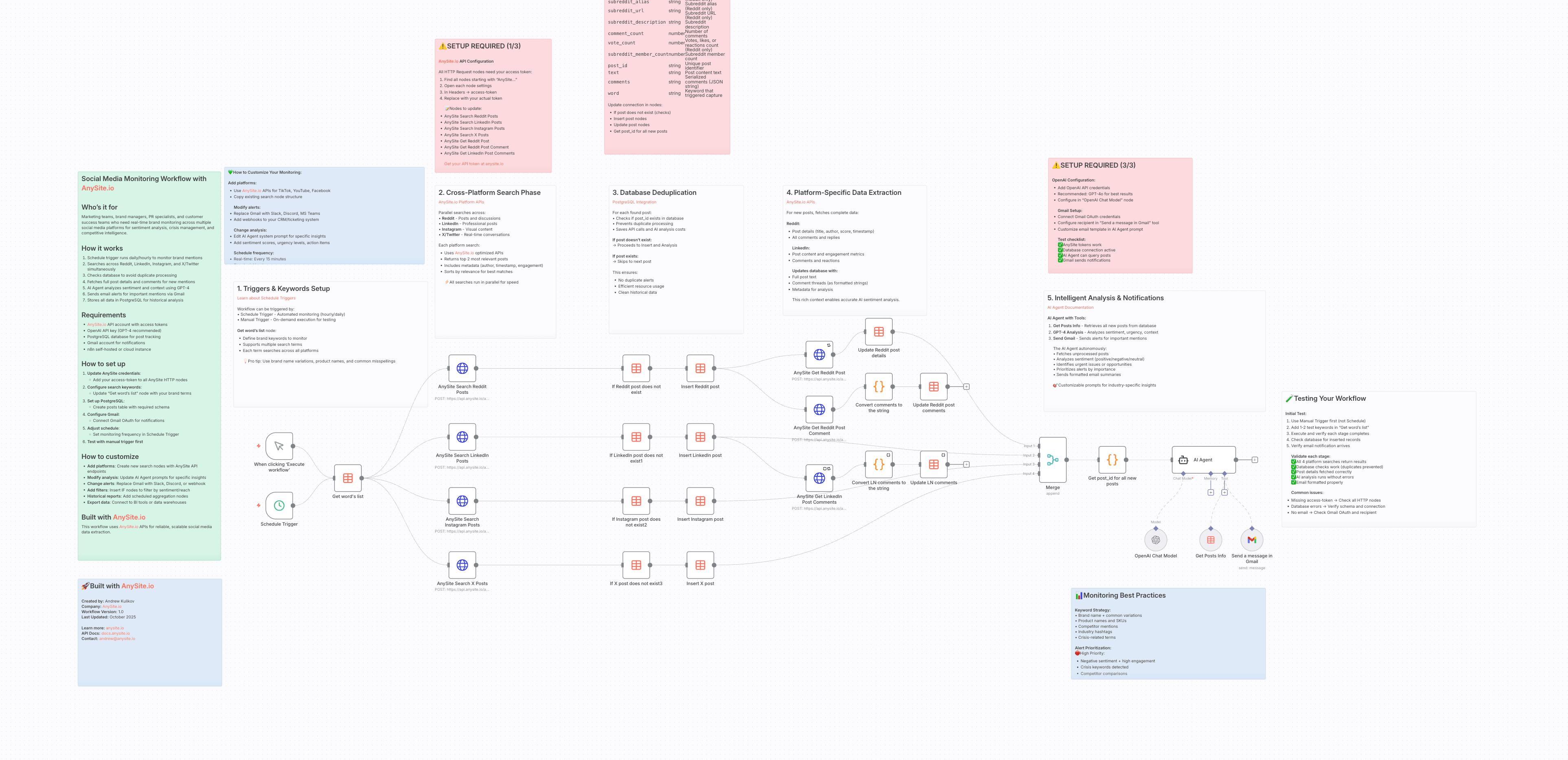
This n8n workflow automates brand monitoring across social media platforms (Reddit, LinkedIn, X, and Instagram) using the AnySite API.
It searches posts mentioning your defined keywords, stores results in n8n Data Tables, analyzes engagement and sentiment, and generates a detailed AI-powered social media report automatically sent to your email.
The workflow runs:
Keyword Loading:
Reads all keywords from the Data Table “Brand Monitoring Words”
Social Media Search:
For each keyword, the workflow calls the AnySite API endpoints:
api/reddit/search/postsapi/linkedin/search/postsapi/twitter/search/posts (X)api/instagram/search/postsDeduplication:
Before saving, checks if a post already exists in the “Brand Monitoring Posts” table.
Data Storage:
Inserts new posts into the Data Table with fields like type, title, url, vote_count, comment_count, etc.
Comments Enrichment:
For Reddit and LinkedIn, retrieves and formats comments into JSON strings, then updates the record.
AI Analysis & Report Generation:
The AI Agent (OpenAI GPT model) aggregates posts, analyzes sentiment, engagement, risks, and generates a structured HTML email report.
Email Sending:
Sends the final report via Gmail using your connected account.
Import the workflow
Import the provided file:
Social Media Monitoring.json
Configure credentials
access-token header with your API keyCreate required Data Tables
| Field | Type | Description |
|---|---|---|
word | string | Keyword or brand name to monitor |
Each row represents a single keyword to be tracked.
| Field | Type | Description |
|---|---|---|
type | string | Platform type (e.g., reddit, linkedin, x, instagram) |
title | string | Post title or headline |
url | string | Direct link to post |
created_at | string | Post creation date/time |
subreddit_id | string | (Reddit only) subreddit ID |
subreddit_alias | string | (Reddit only) subreddit alias |
subreddit_url | string | (Reddit only) subreddit URL |
subreddit_description | string | (Reddit only) subreddit description |
comment_count | number | Number of comments |
vote_count | number | Votes, likes, or reactions count |
subreddit_member_count | number | (Reddit only) member count |
post_id | string | Unique post identifier |
text | string | Post body text |
comments | string | Serialized comments (JSON string) |
word | string | Matched keyword that triggered capture |
| Issue | Solution |
|---|---|
| No posts found | Check AnySite API key and keyword relevance |
| Duplicate posts | Verify Data Table deduplication setup |
| Report not sent | Confirm Gmail OAuth2 connection |
| AI Agent error | Ensure OpenAI API key and model selection are correct |
Created for automated cross-platform brand reputation monitoring , enabling real-time insights into how your brand is discussed online.
